ATX vs. Micro ATX vs. Mini-ITX: Which Motherboard Size Should You Buy?

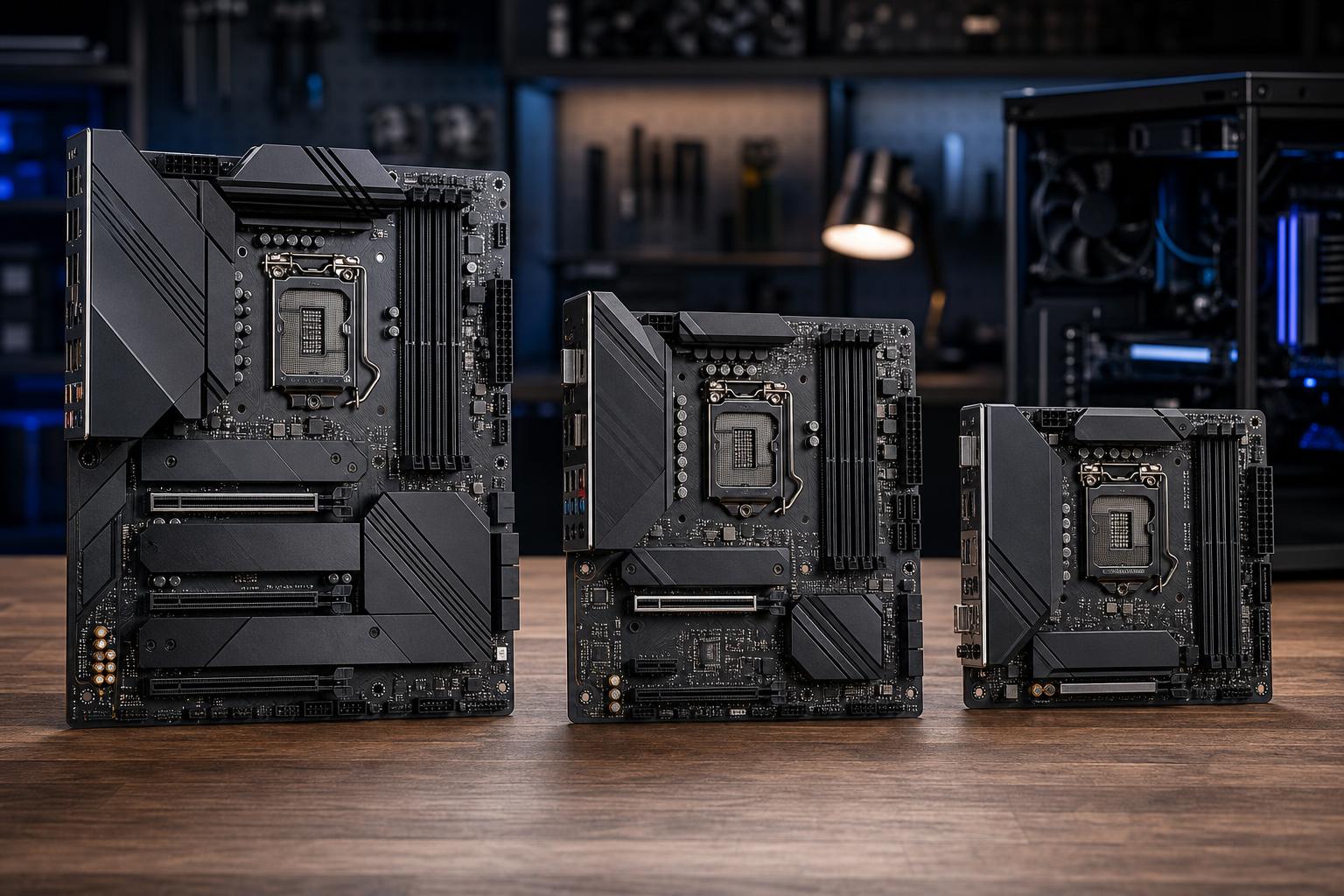
Motherboard form factor sounds like a simple case-size decision. It isn’t. Choosing between ATX, Micro ATX, and Mini-ITX affects the number of expansion slots, storage options, fan headers, USB connectivity, upgrade room, cable management, and sometimes the total cost of the system.
The good news: smaller does not automatically mean slower. A well-designed Micro ATX or Mini-ITX PC can use the same CPU and graphics card as a larger ATX build. The important question is whether the board and case leave room for the hardware you need now and the upgrades you are likely to make later.
For most gaming PCs, we recommend starting with Micro ATX or ATX. Mini-ITX is excellent when a compact system is a real priority, but it asks for more careful part selection and usually costs more.
These are standardized motherboard sizes. Their physical dimensions set the maximum space available for slots, connectors, and other onboard features.
An ATX case will usually accept a Micro ATX board, and many will accept Mini-ITX too. The reverse is not true: a Micro ATX case cannot take a full ATX board, and a Mini-ITX case normally accepts only Mini-ITX. Always check the case manufacturer’s supported motherboard sizes rather than assuming.
ATX remains the easiest recommendation for high-end gaming PCs, powerful workstations, and anyone who wants lots of physical room. A full-size ATX board commonly provides more PCIe slots, more M.2 SSD slots, more SATA ports, more fan headers, and more rear USB ports than a smaller version of the same platform.
That extra space has practical benefits. You have more room around the graphics card, easier cable routing, and more choices for adding expansion cards later. For example, a workstation might need a capture card, high-speed networking card, professional audio interface, additional storage controller, or a second GPU for a specialized workload. ATX gives the builder the best chance of accommodating those parts cleanly.
ATX is also the least stressful format for a first custom PC. Larger cases generally make it easier to install an air cooler, route power cables, fit a long graphics card, and maintain sensible airflow.
The main tradeoff is obvious: ATX cases occupy more desk or floor space. Full-size boards can also cost more than comparable Micro ATX options, although feature level matters more than board size alone.
Micro ATX, often written as mATX, is arguably the best all-around form factor for a large portion of gaming systems. It can support the same current desktop CPUs, DDR5 memory, and full-length graphics cards as ATX. In a suitable case, it can also cool those parts very effectively.
Compared with ATX, Micro ATX gives up some expansion space. It has room for up to four rear expansion slots, while a full ATX board can have up to seven. In the real world, that is rarely a problem for a straightforward gaming PC with one graphics card. Many mATX boards still offer multiple M.2 slots, four memory slots, adequate USB connectivity, and enough fan headers for a properly cooled system.
Micro ATX cases are meaningfully smaller than many ATX towers without becoming difficult to build in. They are often a particularly good fit for a 1440p or 4K gaming PC with one powerful GPU, a standard tower air cooler or 240 mm liquid cooler, and one or two NVMe SSDs.
There is one caution: don’t assume every Micro ATX board is a stripped-down bargain model. Some are, and that may be perfectly fine for a modest build. Others have strong power delivery, Wi-Fi, several M.2 sockets, and excellent connectivity. Compare the actual board features, not just the letters in its form factor.
Mini-ITX is for people who genuinely want a small PC. A good Mini-ITX system can be a powerful gaming machine, a portable production workstation, or a tidy living-room desktop. With careful component selection, it can run a high-performance CPU and a flagship-class graphics card.
But small-form-factor building is an exercise in constraints. A Mini-ITX motherboard has one PCIe expansion slot, which will normally be occupied by the graphics card. It typically has two memory slots, fewer storage connections, fewer fan headers, and less rear connectivity than a comparable ATX board. The boards themselves may cost more because fitting premium features into a small layout is harder.
The case matters even more than usual. Two Mini-ITX cases can have very different limits for graphics card length, card thickness, CPU cooler height, radiator size, and power supply format. Some need an SFX or SFX-L power supply rather than a standard ATX unit. A large GPU may technically fit but leave little space for intake airflow, which can increase fan noise and temperatures.
Mini-ITX is not the best way to save money. It is a way to save space. If the small footprint is not important, Micro ATX often delivers a quieter, easier-to-upgrade PC for less money.
Not directly. An ATX board and a Mini-ITX board using the same CPU, graphics card, memory, and storage can deliver very similar gaming performance. The motherboard form factor does not create frames per second by itself.
Indirectly, it can matter. A compact case with restricted airflow may make the CPU or GPU run hotter and louder. In an especially constrained build, sustained heavy workloads can cause components to reduce clock speeds to stay within safe temperatures. A larger, well-ventilated case gives the cooling system more room to work, but case design and cooler quality matter more than raw case size.
For gaming, prioritize the graphics card, then choose a motherboard and case that can properly support it. Do not buy a smaller case until you have checked the GPU’s exact length, height, thickness, and power-cable clearance requirements.
Form factor is a useful starting point, but the specification sheet decides whether a particular motherboard is right for your build. Before committing, check these items.
A single graphics card uses the main PCIe x16 slot. If you also need a capture card, 10 Gigabit Ethernet adapter, sound card, or other expansion hardware, make sure there is a usable secondary slot with sufficient physical clearance. A large, thick GPU can cover neighboring slots on some boards.
ATX and Micro ATX boards often have four DIMM slots. Mini-ITX boards have two. Two slots are enough for 32GB or 64GB when using a matched two-stick kit, which is plenty for many gaming PCs and quite a few professional systems. Four slots offer more flexibility if you anticipate a large future memory upgrade.
Most modern builds should use an NVMe M.2 SSD as the primary drive. Check how many M.2 slots the board offers, whether installing a drive disables any SATA ports, and whether heatsinks are included for the slots you plan to use. A compact board may still offer ample NVMe storage, but it is less likely to support a pile of SATA drives for archival storage.
Look beyond the rear USB count. If your case has a front USB-C port, the motherboard needs the correct internal header to make it work. Also consider built-in Wi-Fi, the required Ethernet speed, audio connections, and enough fan or pump headers for your cooling plan. Header splitters can help, but starting with the right board is cleaner.
Choose ATX for a workstation, an expansion-heavy build, or a premium system where easy assembly, quiet cooling, and broad upgrade options matter most.
Choose Micro ATX for most single-GPU gaming PCs. It is the practical middle ground: compact enough for a reasonable desk setup, but usually flexible enough for normal upgrades and robust cooling.
Choose Mini-ITX only when compact size is a core requirement. It can be exceptionally capable, but it deserves a complete compatibility plan before parts are ordered.
A well-balanced PC is more valuable than a build that chases the smallest possible case or the largest possible board. If you are planning a gaming PC or professional workstation and want the motherboard, case, cooling, graphics card, and power supply selected as a complete system, contact Overclock Computers. We can help design a configuration that fits your workload, available space, and realistic upgrade plans.