Best Gaming PC for 4K Gaming in 2026: Specs That Make Sense

A 4K gaming PC has one job above all others: deliver the visual settings and frame rates you actually want on a 3,840 × 2,160 monitor. That sounds obvious, but it is where many gaming computer purchases go wrong. Buyers spend heavily on a flagship CPU, RGB hardware, or a huge SSD, then pair them with a graphics card that cannot keep up at 4K.
At this resolution, the GPU matters most. A 4K screen renders four times as many pixels as 1080p and about 2.25 times as many as 1440p. That workload changes the sensible balance of a custom gaming PC. You still need a capable processor, fast memory, solid cooling, and a quality power supply, but the graphics card should receive the largest share of the budget.
Here is how to choose the best gaming PC for 4K based on the games you play, the refresh rate of your monitor, and the features you care about.
“4K gaming” covers several very different targets. A gaming PC built for a 60Hz 4K display does not need the same hardware as one driving a 4K 240Hz OLED monitor. Before choosing parts, decide which of these descriptions sounds most like your setup.
For story-driven games, strategy titles, simulation games, and console-style play on a 60Hz or 120Hz television, a steady 60 frames per second is a good target. A well-chosen upper-midrange or high-end graphics card can provide this experience in many modern games, often with a mix of high settings and sensible use of upscaling.
This is the right place to be practical. Ultra settings are often expensive for a tiny visual gain. Reducing a few demanding options, such as heavy ray tracing, shadow quality, or volumetric effects, can make a large difference to frame rate without making a good-looking game suddenly look bad.
A high-refresh 4K monitor feels noticeably smoother in fast action games, racing games, and shooters. Reaching 100 to 144 FPS at 4K in current demanding titles usually calls for a high-end GPU, especially if you want high-quality settings and ray tracing.
For most buyers seeking a premium 4K system, this is the target we would build around. It provides a substantial improvement over 60 FPS without requiring every component to be the most expensive part available.
A 4K 240Hz monitor is excellent hardware, but it sets a very demanding goal. Even the fastest gaming PCs will not produce 240 native frames per second in every new AAA game at maximum settings. Competitive games, older titles, and well-optimized games can get there; graphically ambitious releases often will not.
Buy this class of system if you play esports titles seriously, value very high refresh rates, and understand that settings adjustments, upscaling, and occasionally frame generation are part of the experience. It is not the best value route for someone who mainly plays cinematic single-player games at 60 to 120 FPS.
For a 4K gaming PC, buy the strongest GPU that fits a balanced budget. At this resolution, moving up one graphics-card tier often produces a more visible improvement than buying a more expensive CPU.
In the current market, cards in the GeForce RTX 5070 Ti and Radeon RX 9070 XT class are a reasonable starting point for 4K gaming with realistic settings expectations. They are better suited to 4K 60 FPS to 100 FPS gaming than to forcing native 4K, maximum ray tracing, and 144 FPS in every new release.
For a more consistent 4K high-refresh experience, an RTX 5080-class GPU is the more natural fit. It has the performance headroom that helps when a game is unusually demanding, when you enable ray tracing, or when you want to hold higher frame rates on a 4K 144Hz display.
An RTX 5090-class GPU makes sense for buyers pursuing the least-compromised 4K experience: heavy ray tracing, a 4K 240Hz monitor, demanding simulation titles, or a long list of games where you want performance headroom for years. It is undeniably powerful, but it is also where diminishing returns become very real. It is not required for enjoyable 4K gaming.
Video memory stores textures, geometry, frame buffers, and other data the GPU needs immediately. Higher resolutions and high-quality texture packs increase VRAM demand. For a new 4K-focused system, we recommend 16GB of VRAM as a practical floor. More is welcome for demanding ray-traced games, modded games, and buyers who intend to keep the same GPU for a long time.
Low VRAM does not always mean a game will fail to run. More often, it causes texture compromises, stutters when moving through a game world, or settings that must be reduced earlier than expected. Those are frustrating problems in a premium gaming computer.
At 4K, games are usually GPU-limited. That means a strong modern gaming CPU is enough for most builds; paying for the most expensive processor will rarely transform 4K frame rates the way a better GPU can.
AMD Ryzen 7 X3D processors are particularly strong choices for a gaming-first custom-built gaming PC. Their large cache can improve performance and consistency in CPU-sensitive games, including many simulation and strategy titles. A current Ryzen 7 non-X3D processor can also be a sensible value choice if it allows more money for the graphics card.
Intel Core Ultra 7 processors are also capable gaming options, particularly for buyers who combine gaming with productivity work. The best choice depends on the specific platform, pricing, and the applications you use outside games. For a 4K gaming-only build, avoid overspending on extra CPU cores that will sit idle while the GPU does the hard work.
Install 32GB of DDR5 memory in a new 4K gaming PC. It is enough for current games, background applications, voice chat, browser tabs, and light streaming. Choose 64GB if you heavily mod games, run virtual machines, edit video, work with large creative projects, or simply want more room for multitasking. More than 64GB is rarely useful for a gaming-first system.
A 2TB NVMe SSD is the practical starting point for a premium gaming build. Modern games are large, and a 1TB drive fills faster than most people expect once Windows, applications, and a few major titles are installed. A second SSD is an easy future upgrade, but starting with 2TB avoids immediate storage management.
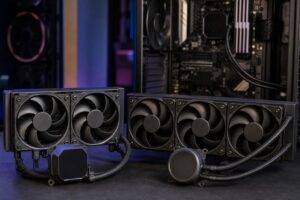
High-end components generate real heat. A good case with unobstructed airflow, properly selected fans, and an appropriately sized CPU cooler keeps clocks stable and noise reasonable. A 360mm liquid cooler can be an excellent fit for a high-power CPU or for buyers who prioritize a clean appearance, but it is not automatically necessary. A high-quality air cooler or 240mm AIO can be the smarter choice for many gaming CPUs.
The important part is the complete thermal plan. A powerful GPU in a restrictive glass box with inadequate intake airflow is not a premium build, no matter how impressive the specification list looks.
Use a reputable, appropriately sized power supply with the correct modern GPU power connection. For many high-end 4K systems, 850 watts is a sensible baseline. A 1,000-watt unit is often worthwhile with the fastest graphics cards or when extra capacity, quieter operation, and future upgrades are priorities. This is not a component to cheap out on.
Yes, with sensible expectations. Modern upscaling can deliver excellent results at 4K because the display has enough pixels to work with. Quality-oriented upscaling modes are often a smart way to gain performance while preserving a sharp image. Ray tracing can improve lighting and reflections, but it remains one of the quickest ways to reduce frame rate.
Frame generation can make motion feel smoother on a high-refresh display, especially in single-player games. It does not reduce input latency in the same way as rendering more native frames, so it is less useful for competitive shooters. For esports, prioritize real frame rate, low latency, and settings that keep frame times stable.
The best gaming PC for 4K is not automatically the most expensive one. It is the system that gives your particular monitor the frame rates, image quality, noise level, and useful lifespan you expect. For most buyers, that means prioritizing a strong GPU, 32GB of RAM, 2TB of fast storage, quality cooling, and a power supply with genuine headroom—not an unnecessarily extreme CPU or decorative extras.
If you are planning a 4K gaming setup and want help matching components to your games, monitor, and budget, contact Overclock Computers. We can design a custom gaming PC around the performance target that matters to you, with the cooling, power delivery, and component balance to support it.