Air Cooling vs. Liquid Cooling: Which CPU Cooler Should You Buy?

Choosing a CPU cooler is more than a cosmetic decision. The right cooler helps your processor sustain its boost speeds, keeps fan noise under control, and can make a high-performance PC far more pleasant to use. The wrong one can leave a powerful CPU running hotter, louder, or more restricted than it needs to be.
For most people, the choice comes down to a quality tower-style air cooler or an all-in-one (AIO) liquid cooler. Both can be excellent. Neither is automatically “better.” The sensible choice depends on the processor, the case, the workload, and how much you value simplicity versus appearance and cooling headroom.
A good air cooler is usually the best value for mainstream gaming PCs, everyday productivity systems, and workstations using efficient midrange CPUs. It is simple, reliable, and often surprisingly quiet.
An AIO liquid cooler makes more sense for high-wattage processors, long rendering or compilation workloads, compact builds with limited CPU-cooler height, and customers who prefer the cleaner look of a radiator-mounted cooling system. A 280 mm or 360 mm AIO can also provide more thermal headroom for processors that pull substantial power under sustained loads.
Modern processors automatically adjust clock speeds based on temperature, power limits, and available electrical current. Better cooling does not turn a midrange CPU into a flagship model, but it can help a compatible CPU hold higher boost clocks for longer.
This matters most in sustained work: video exports, 3D renders, code compilation, simulation, scientific workloads, and lengthy game streaming sessions. A processor that reaches its thermal limit may reduce clock speed to protect itself. It will not suddenly fail, but it may finish demanding jobs more slowly and make more noise while doing it.
Gaming is a little different. Many games do not load every CPU core continuously, so the gap between a strong air cooler and a large AIO can be modest. In that situation, spending extra on liquid cooling may be more about lower noise, visual preference, or preparing for a future CPU upgrade than gaining a dramatic frame-rate increase.
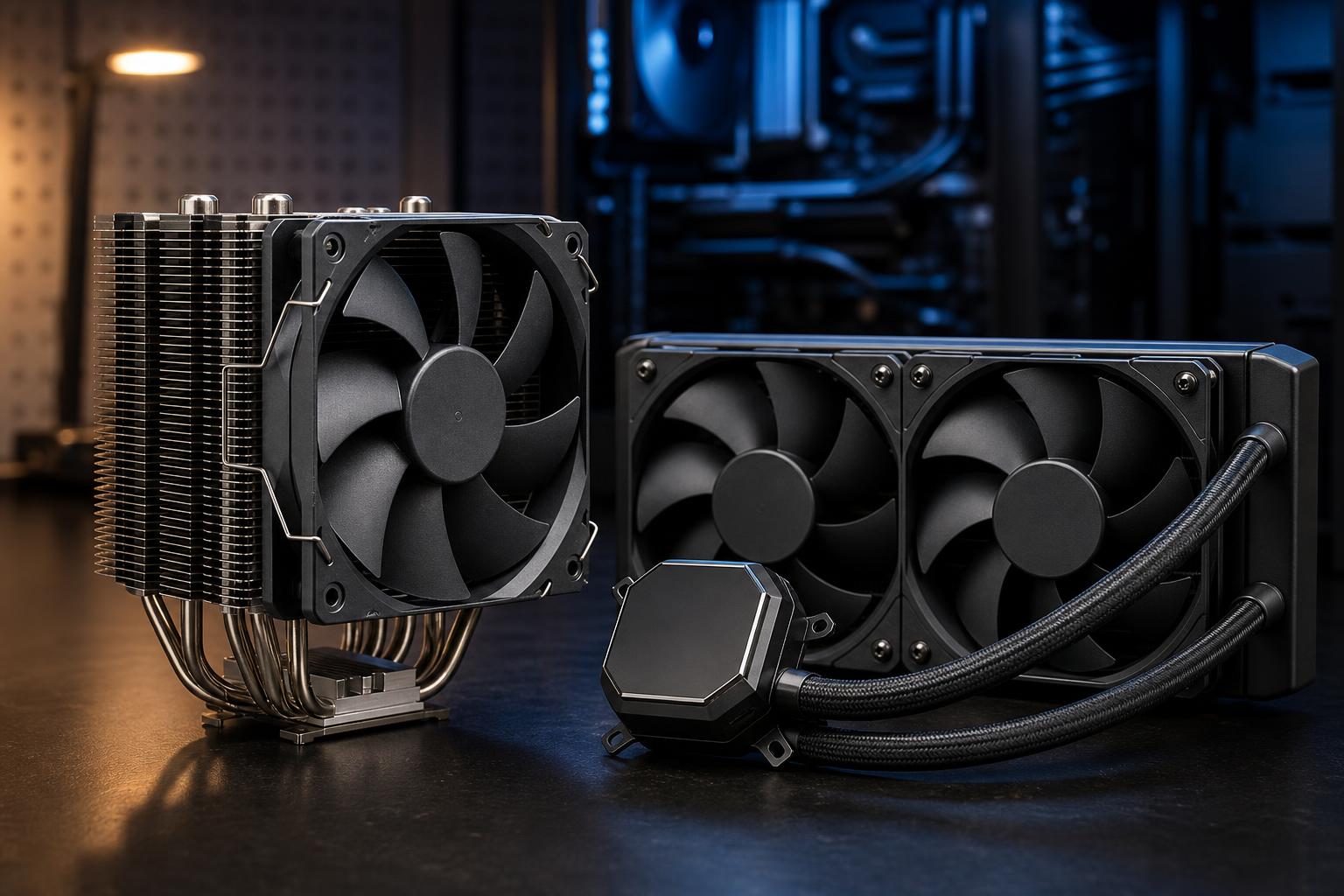
A tower air cooler uses a metal heatsink, heat pipes, and one or two fans. Heat moves from the CPU into the cooler’s base, travels through the heat pipes, and is released into the case airflow through the heatsink fins.
Our practical recommendation: for a gaming PC with a sensible mainstream processor, a quality tower air cooler is often the smart buy. It avoids spending money where it will not noticeably improve the gaming experience. Put that budget toward the graphics card, storage capacity, or a better monitor if those are still compromises.
An AIO cooler is a sealed system containing a pump, cold plate, tubing, and radiator. The pump moves coolant from the CPU block to the radiator, where fans release heat outside the CPU area. Despite the name, an AIO is not a custom liquid-cooling loop and should not need refilling.
Radiator size is commonly described by the number and size of its fans:
A larger radiator generally has more surface area to shed heat, but it is not magic. A poorly ventilated front-mounted 360 mm radiator can still perform worse than expected, particularly if it draws warm air through a restrictive front panel. Case design matters.
Neither cooling type is automatically quieter. A quality air cooler with a large heatsink can run its fans slowly during gaming. A large AIO can also stay quiet because its radiator gives it more surface area. On the other hand, a small AIO may need fast fan speeds and add pump noise, while a small air cooler may need to work hard with a hot CPU.
For a quiet system, prioritize a properly sized cooler, a case with unobstructed airflow, and sensible CPU power settings. A processor does not need to run at its absolute highest allowed power draw to deliver an excellent experience. In some systems, modestly reducing power limits produces a barely measurable performance change but a meaningful reduction in heat and fan noise.
Before buying a cooler, check the case specifications rather than eyeballing it. For air cooling, confirm the maximum CPU cooler height. For AIO cooling, confirm supported radiator sizes and, just as importantly, the radiator thickness and fan clearance in the intended mounting position.
A front-mounted radiator can reduce graphics card clearance. A top-mounted radiator can interfere with tall motherboard heatsinks or memory modules. Large air coolers can cover the first RAM slot, although many models allow the front fan to be raised slightly if the case has enough height.
Also consider airflow direction. In a conventional setup, front or bottom fans bring cool air in, while top and rear fans exhaust warm air. A top-mounted AIO generally works well as exhaust. A front-mounted AIO may produce lower CPU temperatures because it receives cooler outside air, but it can raise GPU temperatures slightly because the graphics card receives air warmed by the radiator. For a GPU-focused gaming PC, that tradeoff deserves attention.
Start with a quality single- or dual-tower air cooler. An AIO is worthwhile if the selected CPU runs hot, the build has a strong aesthetic goal, or the case layout favors a radiator. Do not downgrade the GPU just to fund liquid cooling.
A premium air cooler remains viable, but a 240 mm, 280 mm, or 360 mm AIO can be a good fit for a high-performance processor that will see gaming, streaming, background tasks, and occasional creative work. Choose the radiator size the case can support cleanly rather than forcing the largest possible option.
For workstations handling sustained rendering, editing, compilation, or engineering workloads, cooling deserves more of the budget. A large AIO is often appropriate for high-power desktop CPUs, while a premium air cooler can still be the better reliability-focused choice for a processor with moderate power use. The CPU’s sustained power behavior matters more than its marketing label.
Air cooling is not the budget compromise it is sometimes made out to be. A good tower cooler is quiet, durable, and more than capable for a large share of gaming PCs and professional desktops. Liquid cooling earns its place when a high-power CPU needs extra sustained cooling capacity, when case geometry favors a radiator, or when the customer values its appearance enough to justify the added cost.
The best CPU cooler is the one that fits the case, matches the processor’s actual heat output, and keeps the system quiet without taking budget away from components that will make a larger difference. If you are planning a new PC or are unsure whether your current case and CPU support a particular cooler, contact Overclock Computers. We can help design a balanced cooling setup around the way you actually use your system.