240mm vs. 360mm AIO Cooler: Which Size Should You Buy?

Choosing between a 240mm and 360mm AIO cooler looks simple: more radiator equals more cooling. That is generally true, but it does not mean every PC benefits enough to justify the larger cooler.
The right choice comes down to four things: your CPU’s real power draw, the amount of sustained work it will do, the case you want, and how much you value low noise. A properly selected 240mm AIO can be excellent in a gaming system. A 360mm model is often the smarter choice for a powerful workstation or an enthusiast CPU that spends long periods under heavy load.
Here is how to make the call without buying more cooling hardware than your system needs.
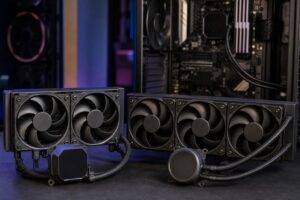
An all-in-one liquid cooler moves heat from the CPU into a radiator, where fans push that heat into the case airflow. A larger radiator has more surface area and usually supports more fans. That gives it two useful advantages:
That second point matters more than many buyers expect. A larger AIO does not always produce dramatically lower temperatures, especially in a gaming PC. Its biggest benefit may be achieving similar temperatures with less fan noise.
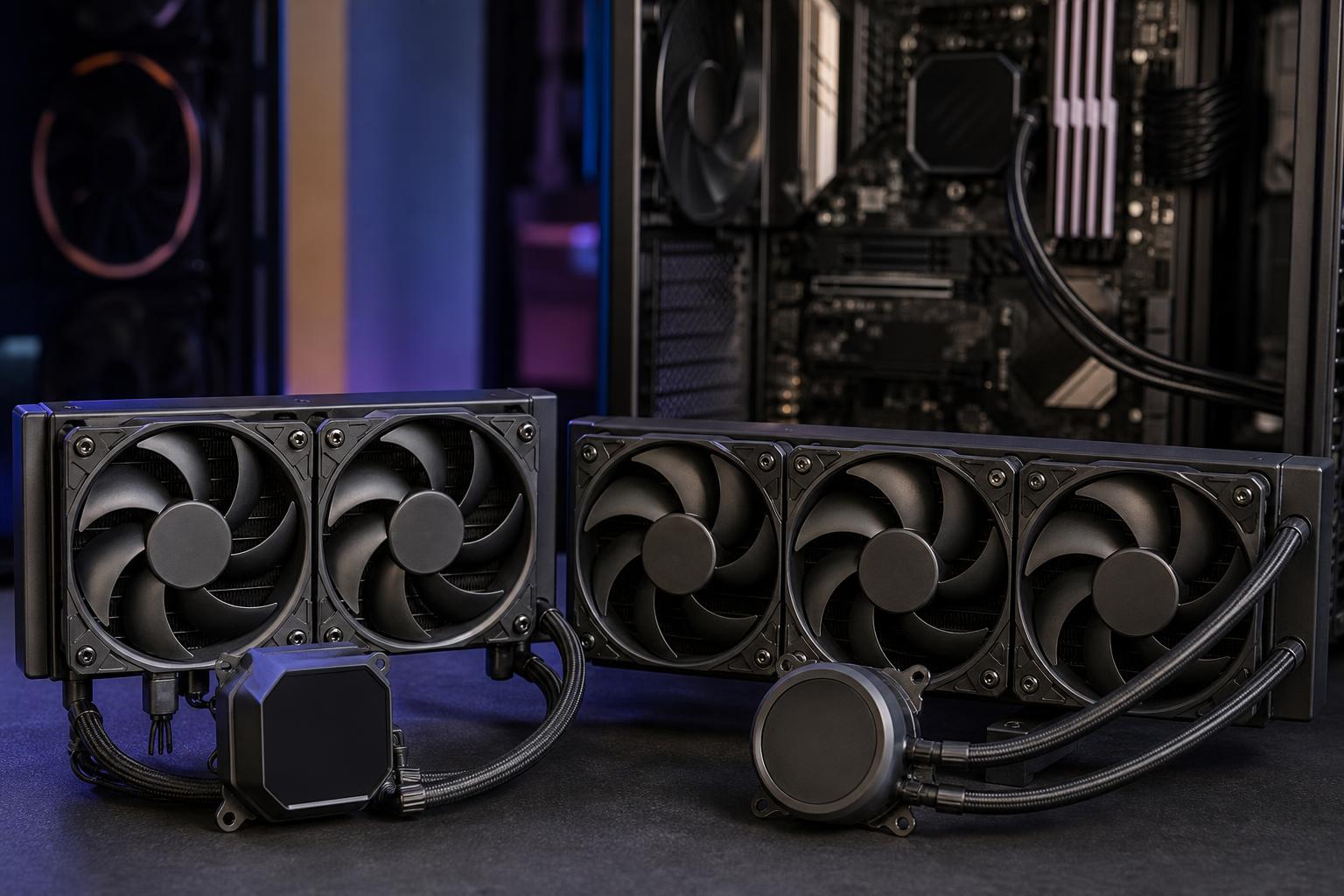
Radiator length is typically described by the number of fans it holds:
There are also 120mm and 420mm models, but they serve narrower needs. A 120mm AIO is rarely a compelling choice when a good tower air cooler fits, while 420mm models require a large case and are mainly for high-power enthusiast and workstation builds.
A quality 240mm AIO is a very capable CPU cooler. It is a sensible fit for many gaming computers, mainstream productivity systems, and compact builds where a 360mm radiator either will not fit or would compromise case airflow.
Most gaming-focused CPUs do not hold their absolute maximum power draw for hours at a time. Games place a varied load on the processor, and the graphics card is usually doing the heavier work. For a midrange or upper-midrange gaming CPU, a 240mm AIO provides ample thermal headroom in a well-ventilated case.
It is also a good match for CPUs with high short-term boost behavior but moderate sustained power. The cooler has enough capacity to handle brief spikes without forcing the system into high fan speeds every time an application opens or a game loads a new area.
A 240mm radiator is easier to place than a 360mm unit. It commonly fits at the top of mid-tower cases, leaving the front of the case open for unrestricted GPU airflow. That is often a better overall thermal arrangement in a gaming build with a large, heat-producing graphics card.
Do not underestimate this. Installing a large radiator in the front of a case can reduce the fresh air available to the GPU. If that makes the graphics card run hotter and louder, the larger CPU cooler has not necessarily improved the whole system.
The money saved over a premium 360mm AIO can often be more useful elsewhere: a larger SSD, better case fans, a higher-quality power supply, or a step up in graphics card performance. For a build that does not have a high-wattage CPU, that is normally the more sensible use of the budget.
A 360mm AIO cooler earns its place when the CPU will produce substantial heat for extended periods, or when the goal is to keep a powerful system quiet while it works.
Video exporting, CPU-based rendering, code compilation, simulation, data processing, and some engineering workflows can keep all CPU cores busy for many minutes or even hours. That is very different from the bursty load of most gaming sessions.
For a high-core-count desktop processor used this way, a 360mm radiator gives the cooling system more time and surface area to shed heat. It can help the CPU maintain stronger sustained boost clocks and prevent the fans from becoming the loudest part of the office.
Some flagship desktop processors can use a great deal of power under unlocked motherboard settings or heavy all-core loads. A 240mm AIO may still function safely, but it may need higher pump and fan speeds to do so. A 360mm AIO is usually the more comfortable choice if you are intentionally buying one of these processors for demanding production work.
For a system that is primarily for gaming, however, pairing the most expensive CPU with the largest available AIO is not automatically the best build. Spending that difference on the GPU usually produces a larger improvement in frame rate.
At similar CPU temperatures, a 360mm radiator can run three fans more slowly than a smaller radiator needs to run two. Actual noise depends on fan quality, case airflow, pump design, and fan tuning, but the larger radiator gives the builder more room to prioritize quiet operation.
This is particularly valuable for a workstation that remains under load near a desk all day. It is also worthwhile for buyers who are sensitive to fan noise and have a case designed to support a top-mounted 360mm radiator cleanly.
The 280mm AIO is the awkwardly named middle option that often deserves more attention. Its two 140mm fans provide a radiator area close to many 360mm designs, while the larger fans can move useful airflow at lower RPM.
A 280mm AIO can be an excellent choice for a powerful gaming CPU or a mixed-use system that games, streams, edits video, and handles occasional heavy CPU tasks. The catch is fitment. Many cases support 240mm and 360mm radiators but do not support 280mm radiators in the preferred top position.
Always check the case manufacturer’s radiator clearance information. “Supports a 360mm radiator” does not guarantee clearance for a thick radiator, fans, tall motherboard heatsinks, or memory modules.
Before selecting any AIO, check more than the radiator length. You need to know where it will mount and what hardware will sit near it.
For front-mounted radiators, a common best practice is to keep the radiator’s highest point above the pump when the case layout allows it. This helps keep any air in the loop away from the pump, reducing the chance of pump noise over time.
Do not judge a cooler only by one reported CPU temperature. Modern processors are designed to boost aggressively until they reach a power, current, or temperature limit. A stronger cooler may allow higher clock speeds rather than producing a dramatically lower number on a monitoring screen.
What matters in practice is whether the system maintains expected performance during your real workload, avoids excessive fan noise, and remains stable. A few degrees of difference between coolers is rarely worth chasing if both are performing properly.
For most gaming PCs, start with a quality 240mm AIO cooler or a strong dual-tower air cooler. Move to a 280mm or 360mm AIO when you have a CPU with sustained high power draw, regularly run demanding multi-core workloads, or specifically want a quieter high-performance system.
Buy a 360mm AIO because your processor and workload justify it, not because it looks like the expected accessory for an expensive PC. A balanced cooling plan, a case with good airflow, and sensible fan curves will do more for the everyday experience than simply installing the largest radiator that fits.
If you are planning a gaming PC or professional workstation and are unsure how much cooling it needs, contact Overclock Computers. We can help match the CPU, cooler, case, and airflow layout to the way you will actually use the system.