PCIe Lanes Explained: When They Matter in a Gaming PC or Workstation

PCIe lanes are one of those PC specifications that sound crucial, then disappear into motherboard manuals written in suspiciously small print. For many systems, that is fine: a standard gaming PC with one graphics card and a couple of NVMe SSDs rarely has a lane-count problem.
They matter much more when a build needs several fast storage drives, a capture card, 10 Gigabit networking, professional add-in cards, or multiple GPUs. In those cases, choosing a platform with more PCIe lanes can prevent frustrating compromises such as a slot that runs slower than expected or an M.2 socket that disables a SATA port.
Here is what PCIe lanes do, how to recognize a real limitation, and when it is worth paying for a more expandable platform.
PCI Express, usually shortened to PCIe, is the connection system used by a PC’s graphics card, NVMe storage drives, and most internal expansion cards. A lane is a dedicated two-way data path. More lanes provide more potential bandwidth.
PCIe devices are commonly described by their lane width:
PCIe generation also matters. Each newer generation raises the bandwidth available per lane. For example, PCIe 5.0 x8 has roughly similar raw bandwidth to PCIe 4.0 x16. That does not mean every device benefits equally, but it explains why a modern x8 connection is not automatically a problem.
A motherboard does not create unlimited PCIe lanes on its own. Its available connections come from two places: the CPU and the motherboard chipset.
CPU-connected lanes are typically used for the primary graphics card and one or more primary NVMe slots. These are the most direct connections, with low latency and no shared chipset link in between.
Chipset-connected lanes handle additional M.2 slots, SATA ports, USB controllers, networking, and extra PCIe slots. The chipset itself connects back to the CPU through a fixed uplink. This means several chipset-connected devices may share the bandwidth of that link when they are all busy at once.
That shared path sounds alarming, but it is rarely an issue in normal use. A game loading from one SSD while you browse the web, for example, is not close to a serious bandwidth conflict. It becomes more relevant when several fast devices are working heavily at the same time, such as copying files between multiple NVMe drives while ingesting footage from a high-speed capture device.
A graphics card installed in the top x16-length slot is normally the right starting point. But the physical size of a slot and its electrical lane width are not always the same. A full-length slot may operate at x16, x8, or x4 depending on the board, processor, and which other slots are occupied.
For a typical current-generation gaming GPU, moving from PCIe 4.0 x16 to PCIe 4.0 x8 usually has a small effect on game performance. In many games, it is difficult to notice outside careful benchmark testing. PCIe 5.0 x8 is also generally ample for a modern GPU.
There are exceptions. A card running on an older PCIe generation, a lower-end GPU with a narrow native interface, or a workload that frequently moves large data sets between system memory and VRAM can be more sensitive. Still, a well-designed modern system with a primary GPU at PCIe 4.0 x8 is not inherently flawed.
The bigger concern is a primary graphics card forced to PCIe 3.0 x4 or PCIe 4.0 x4. That is a much narrower connection and can produce meaningful performance losses in some games and GPU-accelerated professional work. This situation is most likely with unusual motherboard layouts, riser cards, or expansion-heavy small-form-factor builds.
Most consumer NVMe SSDs use four PCIe lanes. A motherboard may advertise four or five M.2 slots, but that does not mean every slot has an identical connection.
Common arrangements include:
None of these arrangements is automatically bad. The key is knowing what you are connecting. For a gaming PC, put the main SSD in the preferred CPU-connected M.2 slot when the manual recommends it, then add storage as needed. A second or third chipset-connected PCIe 4.0 NVMe drive remains extremely fast for game libraries, media, and general project storage.
For a workstation that reads and writes large files constantly, drive placement deserves more planning. Video editing, photogrammetry, local AI datasets, and high-resolution scientific or engineering data can benefit from separate drives for the operating system, active projects, cache or scratch data, and long-term storage. At that point, the motherboard lane map is no longer trivia. It is part of the system design.
PCIe lanes become important when you add hardware beyond a graphics card and a few SSDs. Examples include:
A basic x1 card is usually easy to accommodate. A card with multiple NVMe drives is a different story. It may need PCIe bifurcation, which allows a larger slot’s lanes to be split among several devices, such as x16 becoming four x4 connections. Bifurcation support depends on both the CPU platform and the motherboard firmware. Do not assume an adapter card will expose four drives at full speed simply because it physically fits in an x16 slot.
Multiple-GPU systems need even more care. Modern gaming rarely benefits from two GPUs, and traditional multi-GPU game support is effectively gone. A second GPU can still make sense for certain rendering, machine-learning, visualization, or virtualized workloads, but the software must support the arrangement. It is not a shortcut to doubling performance.
A mainstream desktop platform is a strong fit for most gaming PCs, streaming systems, and many creator workstations. It is usually enough if your configuration looks like this:
Do not buy an expensive workstation-class platform just because it has a larger lane count on a specification sheet. More lanes provide value only when the PC has enough devices and sustained data traffic to use them. For a single-GPU gaming system, money is often better spent on the graphics card, monitor, storage capacity, cooling, or a quality power supply.
A higher-lane workstation platform is worth serious consideration when the machine needs to run a powerful GPU alongside several full-speed NVMe drives and multiple bandwidth-hungry add-in cards. It is also sensible for professional systems where expansion is expected over several years.
Examples include a post-production workstation with high-speed shared storage, internal capture hardware, several scratch drives, and a GPU; a rendering system with multiple GPUs; or a data-processing workstation using several direct-attached NVMe datasets. In these machines, extra lanes reduce compromises and leave room to grow.
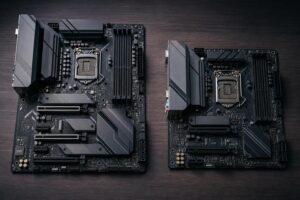
There is another practical advantage: workstation boards often provide more physical slot spacing and better support for large expansion cards. A system can technically have enough lanes yet still be awkward to build if a triple-slot GPU blocks the slots needed for storage or networking hardware. Physical layout matters.
PCIe lane count is not a performance score. It is an expansion and connectivity budget. A well-balanced PC makes sure the devices that need direct, high-bandwidth connections receive them without creating pointless expense elsewhere.
For most people, one GPU and a few NVMe SSDs fit comfortably on a mainstream platform. For storage-heavy and expansion-heavy workstations, the lane map can determine whether the machine remains fast, flexible, and easy to upgrade or becomes a collection of avoidable tradeoffs.
If you are planning a system with multiple NVMe drives, high-speed networking, capture hardware, or specialized PCIe cards, contact Overclock Computers with your software and device list. We can help design a configuration that has the connectivity you need without paying for lanes that will sit unused.