ATX vs. Micro ATX: Which Motherboard Size Should You Buy?

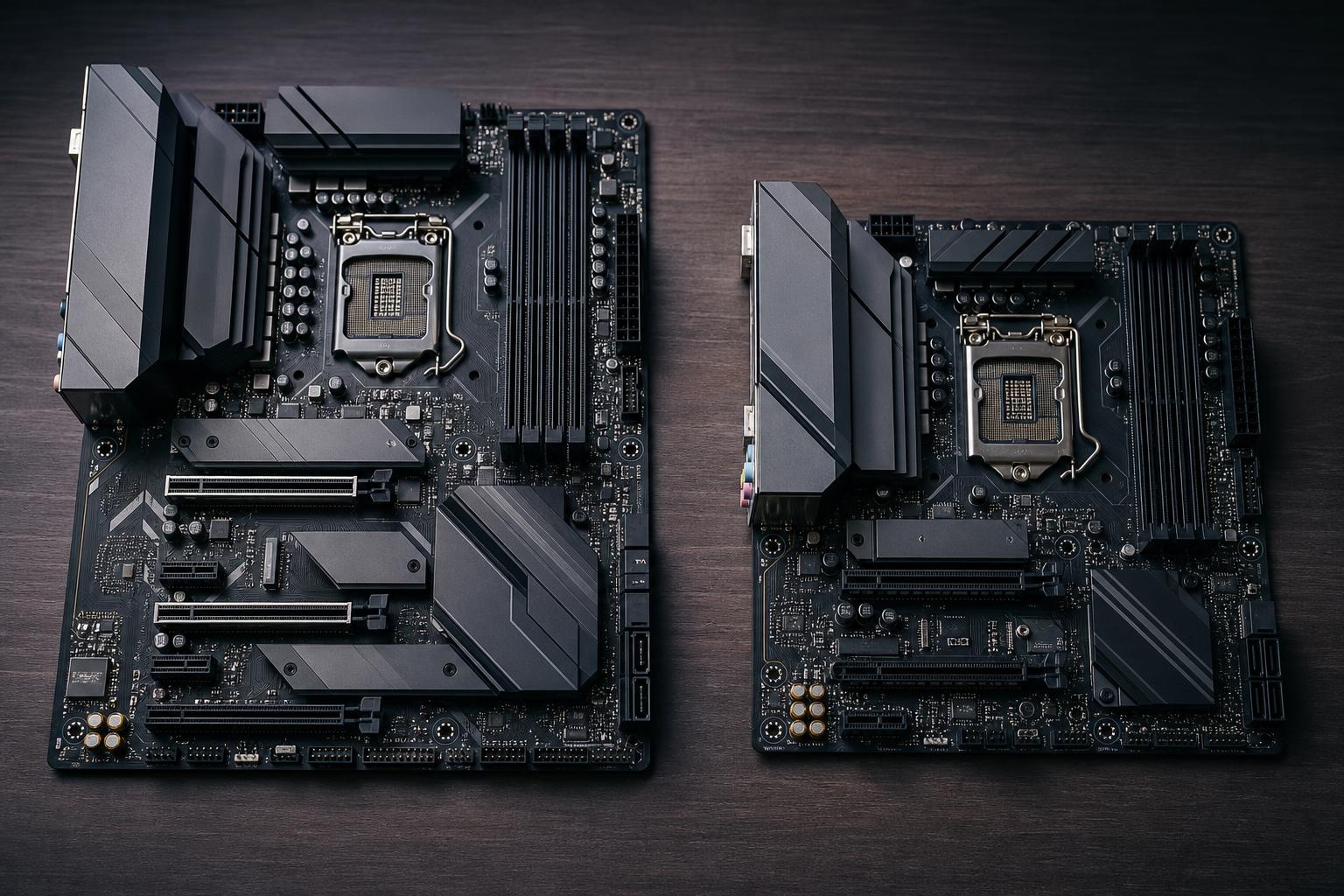
Choosing between an ATX and Micro ATX motherboard is less about raw performance than most buyers expect. A well-equipped Micro ATX board can run the same CPU, graphics card, memory, and SSD as an ATX board. Put the same components in both, and gaming frame rates will be effectively identical.
The difference is physical size and the room that size creates for expansion slots, storage connections, ports, power delivery, and airflow around the board. Those details matter when you are choosing a case, planning upgrades, or building a workstation that needs more than one add-in card.
For many gaming PCs, Micro ATX is the sensible choice. For heavily expanded systems, large workstations, or buyers who simply want more layout flexibility, ATX remains the safer default. Here is how to decide.
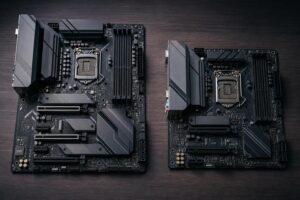
Standard ATX motherboards measure 12 by 9.6 inches. Micro ATX, often written as mATX, boards are the same width but shorter: up to 9.6 by 9.6 inches. That missing lower section is where most of the practical differences appear.
Both formats use the same mainstream desktop processors, DDR5 memory, NVMe SSDs, graphics cards, and power supplies. An ATX board does not make a processor faster merely because it is bigger. It earns its space through connectivity and expansion.
A common assumption is that an ATX build is automatically more powerful. It is not. CPU performance depends on the processor, its cooling, motherboard power delivery quality, BIOS settings, and the workload. GPU performance depends primarily on the graphics card, its power limit, cooling, and the game or application.
There are excellent Micro ATX boards with strong voltage-regulator modules, high-speed DDR5 support, multiple M.2 slots, Wi-Fi, and fast USB connectivity. There are also entry-level ATX boards with fewer features than a premium mATX model.
Compare the specific board, not only the form factor. In particular, a high-power CPU deserves a board with capable power delivery and heatsinks around the CPU socket, regardless of whether the board is ATX or Micro ATX.
Most modern gaming PCs use one large graphics card. If that describes your system, the additional PCIe slots on a full ATX board may sit empty for its entire life. A Micro ATX board normally provides the main full-length PCIe slot for the GPU and one or two additional slots below it.
ATX boards commonly offer several more slots. That matters if you expect to add hardware such as:
There is a catch: modern graphics cards are often three or four slots thick. Even on an ATX motherboard, a large GPU can physically cover one or more lower expansion slots. Always check the motherboard slot layout and case clearance before assuming every slot will remain usable.
For a typical single-GPU gaming PC with Wi-Fi built into the motherboard, Micro ATX expansion is usually enough. For a workstation with several add-in cards, choose ATX from the beginning. Retrofitting needed expansion later is an annoying and expensive reason to replace a motherboard.
ATX boards tend to have more M.2 sockets, SATA ports, USB headers, and rear-panel USB ports. “Tend to” is the key word. Features vary widely by model and price tier.
A gaming system with one or two NVMe SSDs does not need six SATA ports or four M.2 sockets. On the other hand, a video editor may want a fast operating-system drive, a separate project drive, a scratch/cache drive, and several large SATA drives for archives. That buyer should count storage connections carefully rather than choosing by board size alone.
The same applies to USB. If you use a VR headset, external SSDs, a webcam, an audio interface, a card reader, and several other peripherals, rear USB ports and internal front-panel headers are worth checking before purchase. A USB hub can solve a shortage, but it is better not to make it a permanent crutch for a new premium PC.
Not automatically. Motherboard size has far less effect on temperatures than case airflow, CPU cooler selection, fan placement, graphics card design, and sensible power settings.
ATX cases are often larger, and a larger case can make cable routing and radiator placement easier. It may also provide more room for intake fans and allow more space around a large graphics card. Those are real advantages in a high-wattage system.
But a good Micro ATX airflow case with a proper front intake, a quality CPU cooler, and correctly selected fans can cool a powerful gaming PC extremely well. Small does not have to mean hot. The problem comes from treating a compact case as a place to hide unrestricted high-end hardware with too little airflow. Physics remains stubbornly unimpressed by tidy aesthetics.
If you are building with a flagship-class GPU, a high-core-count CPU, or a large liquid cooler, select the case and cooling layout first. Then choose an ATX or Micro ATX motherboard that fits that plan.
An ATX case can usually accept both ATX and Micro ATX motherboards. A Micro ATX case usually accepts Micro ATX but not full ATX. Check the manufacturer’s supported motherboard sizes; case names are not always perfectly descriptive.
Micro ATX is often a good middle ground for people who want a noticeably smaller system without the tighter component selection and building compromises that can come with Mini-ITX. It gives up some expansion, but it typically retains standard power supplies, conventional CPU coolers, and useful cable-routing space.
ATX is best if you prefer a spacious build, want maximum component choice, or expect to install several drives and add-in cards. It is also easier to work inside, which has real value when you are upgrading or troubleshooting later.
Micro ATX boards are often less expensive than equivalent ATX models because they use less circuit-board material and have fewer expansion slots. A smaller compatible case may also cost less. That can free budget for the component that directly affects your experience, such as a faster GPU, additional memory, or more SSD capacity.
However, do not buy the cheapest mATX board just because it is compact. Make sure it has the wireless networking, rear I/O, storage connections, memory capacity, and CPU support you need. Likewise, do not pay for an elaborate ATX board loaded with slots and controllers you will never use.
For a straightforward gaming PC, Micro ATX is often the best value: it does the job without paying for unused expansion. For a professional workstation, a capture-heavy streaming setup, or a system intended to grow over several upgrades, ATX provides useful breathing room.
Start with the parts and peripherals your computer must support, then choose the board size that gives you enough connections and expansion without buying empty slots for their own sake. At Overclock Computers, we can help match the motherboard, case, cooling, and expansion plan to the way you actually use your PC. Contact us when you are ready to plan a balanced custom system.